Managing your Token
Limit
Automatically sell when your token hits a target market cap, or buy when it drops to one, even while you're away.
A limit strategy waits for a market cap you choose: a limit sell sells when your token reaches it, and a limit buy buys when the market cap drops to it.
Limit selling
Section titled “Limit selling”Create a limit sell to sell automatically when your token reaches a price level, so you take profit at your target even when you're away.
Limit buying
Section titled “Limit buying”Create a limit buy to buy automatically when your token's market cap drops to a level, so you buy the dip at your target even when you're away.
Creating a limit strategy
Section titled “Creating a limit strategy”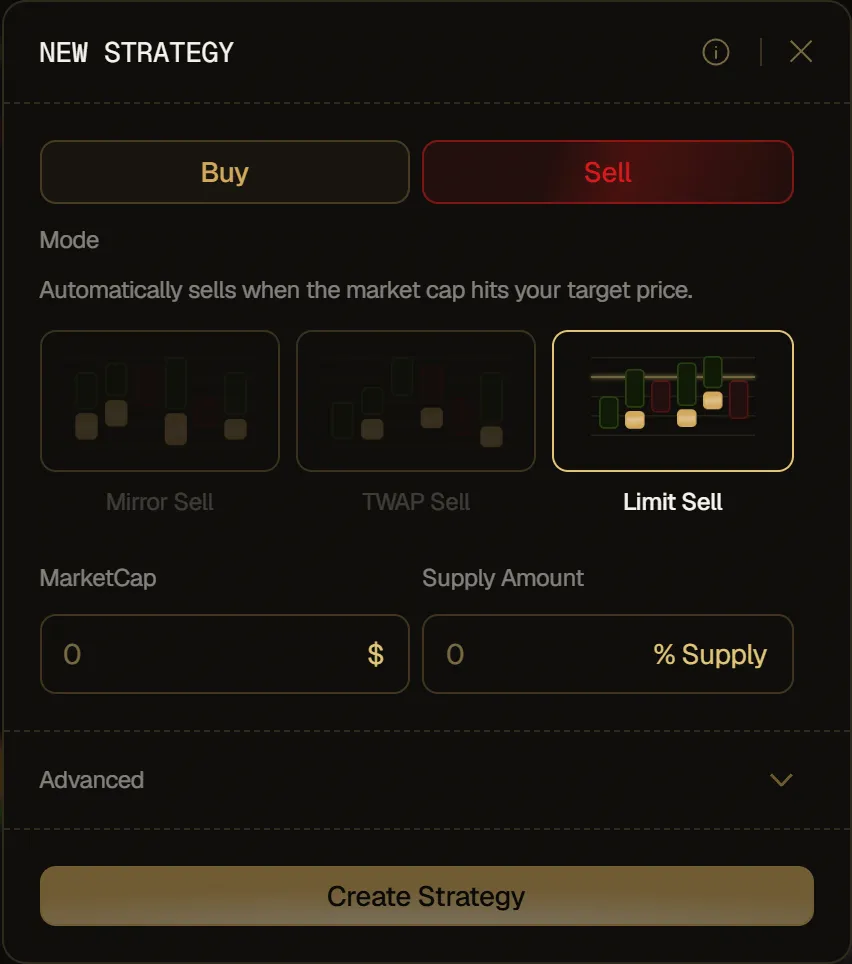
- Pick Sell or Buy at the top, then Limit Sell or Limit Buy under Mode.
- Set the target market cap, in $:
- Sell: in MarketCap, choose the market cap where you want to sell your position.
- Buy: in Buy when MarketCap ≤, choose the market cap your token has to drop to.
- Set the amount:
- Sell: in Supply Amount, choose how much to sell when that level is reached, as a % of the selected wallets' tokens that other strategies haven't locked (before launch, of what they're set to receive at launch). For example, 50 sells half of them.
- Buy: in Amount, choose how much to spend when that level is reached, in SOL, ETH or the token's paired asset, as shown in the field.
- Click Create Strategy.
The target has to be ahead of the current market cap: above it for a limit sell, below it for a limit buy. Otherwise the strategy would trade right away, so Create Strategy stays greyed out.
Advanced options:
- Duration: set how long the strategy runs, in hours, minutes and seconds. Leave it empty for no deadline.
- Wallets: pick which wallets to include. All of them are selected by default.